How to Calibrate Your Oven Temperature (And Stop Guessing With Recipes)
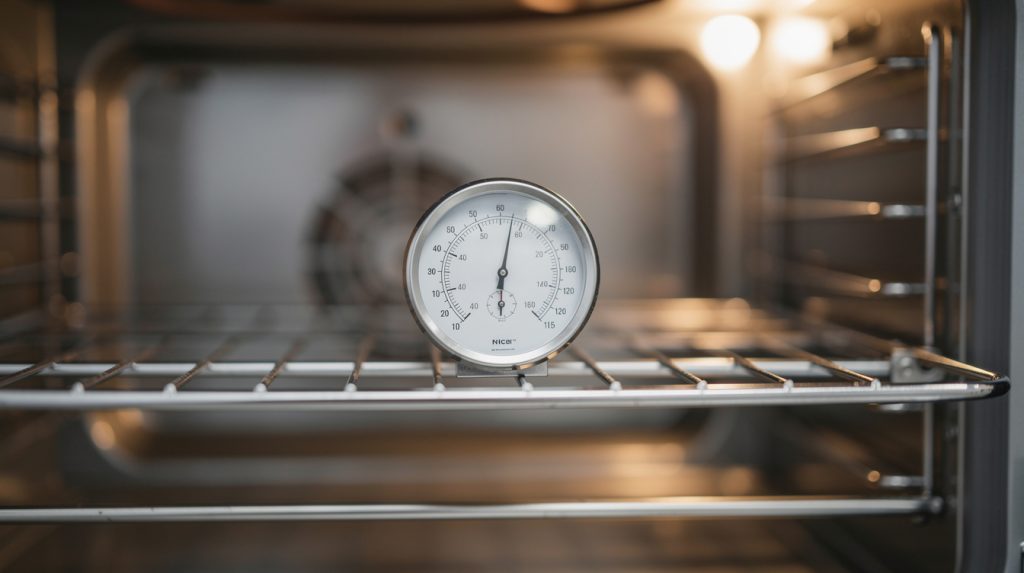
Your cookies say 350°F. Your oven’s display says 350°F. But the cookies that come out are pale and doughy — or scorched around the edges — and you’ve started adding “just five more minutes” to every recipe out of habit. Sound familiar? Your oven may be lying to you. Ovens drift out of calibration over time, and a unit that’s 25 or even 50 degrees off its displayed temperature is far more common than most home cooks realize.
The fix usually doesn’t require a repair call or a new part. Most electric ovens can be tested and recalibrated at home in an afternoon, and we’ll show you exactly how. Whether you’re baking in Tampa or batch-cooking Sunday dinners in The Villages, here’s how to make your oven honest again.
Why Ovens Drift Out of Calibration
Inside your oven, a temperature sensor (a thin probe usually mounted on the back wall) constantly reports the internal temperature to the control board, which cycles the heating elements on and off to hold the set point. Calibration is the relationship between what the sensor reads and what the display claims. That relationship drifts for a few reasons:
- Sensor aging: the sensor’s electrical resistance changes slightly over years of heat cycles, skewing its readings
- Element wear: a weakening bake element heats more slowly, lengthening preheats and exaggerating temperature swings
- Door seal leaks: a worn gasket lets heat escape, creating a real temperature that’s lower than the measured one near the sensor
- Factory tolerance: some ovens are simply shipped a little off — ±15°F out of the box isn’t unusual
One important distinction before we start: calibration fixes an oven that’s uniformly wrong — consistently too hot or too cool everywhere. If your oven burns things on one side while undercooking the other, that’s an evenness problem with different causes, which we cover in our guide to fixing an oven that won’t heat evenly.
Step 1: Test Your Oven’s True Temperature
Don’t trust a single reading — here’s the method that gives you a number you can act on.
What You’ll Need
- A standalone oven thermometer ($7–$15 at any grocery or hardware store — the analog dial type works fine)
- An hour of time
- A notepad
The Test Procedure
Place the thermometer in the center of the middle rack — not touching the walls, not hanging off the rack edge. Set the oven to 350°F and let it preheat fully, then give it an extra 20 minutes to stabilize. (The preheat beep often sounds early, when the air is hot but the oven walls haven’t soaked up heat yet.)
Now record the thermometer reading every 10 minutes for 40 minutes — four readings. Why multiple readings? Because ovens naturally swing above and below the set point as elements cycle. A single glance might catch the top or bottom of a swing. Average your four readings: that average is your oven’s true temperature at a 350°F setting.
Interpreting the result:
- Within 15°F of 350°F: your oven is within normal tolerance. Recipes should behave; no action needed.
- 15–50°F off: classic calibration drift. Proceed to Step 2 — you can fix this yourself.
- More than 50°F off, or swinging wildly between readings: likely a failing temperature sensor or element. Calibration won’t mask a dying part — skip ahead to the “When Calibration Isn’t Enough” section.
Step 2: Adjust the Calibration
Nearly every electric oven made in the last 20 years has a built-in calibration offset that shifts the displayed temperature up or down, typically in 5°F increments up to ±35°F. The exact button sequence varies by brand, so check your manual (search the model number + “calibration” if the paper copy is long gone), but here’s where it usually lives:
GE and Frigidaire
Most models: press and hold the Bake button for several seconds until the display shows a calibration value (0 or SF), then use the +/– or number pad to enter the offset. If your oven ran 25°F cool in the test, set the offset to +25 (or the nearest increment).
Whirlpool, Maytag, and KitchenAid
Typically accessed through the settings/tools menu, or by pressing and holding Bake. Look for “Oven Calibration” or “Temp Adjust.” These brands usually allow ±30°F adjustment in 5- or 10-degree steps.
Samsung and LG
Usually in the Settings menu under “Oven Calibration” or via holding the Bake/Options key. LG models often adjust in 5°F steps to ±35°F. On smart models, some adjustments can even be made through the app.
Older Ovens with Dial Thermostats
If your oven has a mechanical dial, pull the knob off and look at the back — many have a small adjustment screw inside the knob shaft, marked with directional arrows. Small turns make big changes, so adjust in tiny increments and retest.
After setting the offset, repeat the thermometer test from Step 1. You’re aiming to get the 40-minute average within 10–15°F of the set point. It may take two rounds of adjustment — that’s normal.
When Calibration Isn’t Enough
If your oven is more than 50°F off, won’t hold a stable temperature, or maxes out the calibration range and still runs wrong, a component is failing. The usual suspects, in order:
The Temperature Sensor
The most common culprit, and thankfully one of the cheapest. The sensor’s resistance should measure around 1,080–1,100 ohms at room temperature on most brands; a multimeter check takes two minutes. Replacement sensors typically cost $20–$60 in parts, and professional replacement usually runs $100–$200 all-in.
The Bake Element
A weakening element may still glow but deliver less heat than designed, producing long preheats and low actual temperatures. Visible blistering, sagging, or dark spots on the element are giveaways. If your oven won’t heat at all, start instead with our guide on fixing an oven that won’t turn on.
The Door Gasket
Run your hand around the closed door (oven warm, not blazing) and feel for escaping heat. A leaking gasket lowers real-world cooking performance no matter what the sensor says, and it makes your kitchen hotter — the last thing a Florida kitchen needs in June. A door that visibly doesn’t sit flush has its own set of causes, covered in our article on fixing an oven door that won’t close.
The Control Board
Least common and most expensive ($200–$400). Suspect it only after the sensor and element test healthy, especially if you’re also seeing erratic display behavior or error codes.
Pro Tips for an Honest Oven
- Keep a thermometer in the oven permanently. It’s the cheapest insurance in cooking — you’ll spot future drift the moment it starts.
- Retest once a year. Calibration isn’t a one-time fix; sensors keep aging. A January retest is a nice tradition (your Thanksgiving turkey will thank you in advance).
- Don’t test with the self-clean cycle running hot. In fact, go easy on self-clean generally — its extreme temperatures are notoriously hard on sensors, elements, and door locks.
- Let the oven fully stabilize before baking anything fussy. Even a perfectly calibrated oven needs 15–20 minutes past the preheat beep for wall temperatures to even out.
- Mind the racks. Crowded racks and foil-lined floors distort airflow and skew real temperatures regardless of calibration.
Is It Worth a Service Call?
Honestly: if the thermometer test shows simple drift, try the DIY calibration first — it costs nothing and fixes the majority of “my oven runs hot/cold” complaints. Where a professional earns their fee is when parts are involved: sensor and element replacements involve live electrical connections and panel removal, and a misdiagnosed control board is an expensive mistake to make twice.
If your oven is past calibration’s reach, the team at SkyBreeze Appliance Repair can test the sensor, element, and board in a single visit and give you an honest number on the spot. We service electric ovens and ranges across Tampa, Wesley Chapel, Lutz, Land O’ Lakes, Shady Hills, Hudson, Dade City, Zephyrhills, and The Villages — and we’re happy to verify your calibration while we’re there.
An accurate oven turns recipes from gambles back into instructions. One $10 thermometer and one afternoon is usually all it takes.